# Fahrzeugkontrolle mit dem Tablet (FolderSync)

**1.** <span style="font-size: 10.0pt; font-family: Roboto; mso-bidi-font-family: Tahoma;">Vor dem Beginn der Kontrolle muss </span><span style="font-size: 10.0pt; font-family: Roboto; mso-bidi-font-family: Tahoma;">der Ordner synchronisiert werden, um </span><span style="font-size: 10.0pt; font-family: Roboto; mso-bidi-font-family: Tahoma;">immer mit den neusten Dokumenten zu arbeiten!  
  
  **Tippen Sie auf folgendes Symbol**. <span style="font-size: 10.0pt; line-height: 107%; font-family: Roboto; mso-fareast-font-family: Calibri; mso-fareast-theme-font: minor-latin; mso-bidi-font-family: Tahoma; mso-ansi-language: DE; mso-fareast-language: EN-US; mso-bidi-language: AR-SA;">Dieses wird wahrscheinlich entweder „<u>Fahrzeugkontrolle</u>“ oder nach <u>Ihrem Betrieb</u> benannt sein. </span></span>

[![grafik.png](https://booky.spiegelblank.de/uploads/images/gallery/2025-09/scaled-1680-/Xb4grafik.png)](https://booky.spiegelblank.de/uploads/images/gallery/2025-09/Xb4grafik.png)  
**<span style="font-size: 10.0pt; font-family: Roboto; mso-bidi-font-family: Tahoma; color: red;">Hinweis:</span>**<span style="font-size: 10.0pt; font-family: Roboto; mso-bidi-font-family: Tahoma; color: red;"> Die Synchronisierung kann </span><span style="font-size: 10.0pt; font-family: Roboto; mso-bidi-font-family: Tahoma; color: red;">je nach Größe des Ordners mehrere </span><span style="font-size: 10.0pt; font-family: Roboto; mso-bidi-font-family: Tahoma; color: red;">Minuten dauern. Um sicherzustellen, dass die Synchronisation abgeschlossen ist, öffnen Sie die App "FolderSync".   
</span>

[![grafik.png](https://booky.spiegelblank.de/uploads/images/gallery/2025-09/scaled-1680-/jFYgrafik.png)](https://booky.spiegelblank.de/uploads/images/gallery/2025-09/jFYgrafik.png)

[![grafik.png](https://booky.spiegelblank.de/uploads/images/gallery/2025-09/scaled-1680-/60rgrafik.png)](https://booky.spiegelblank.de/uploads/images/gallery/2025-09/60rgrafik.png)  
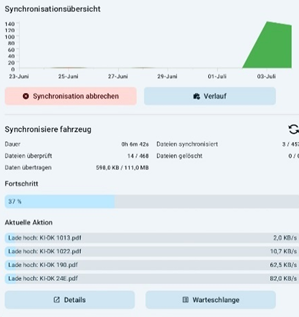
*Wenn der Bildschirm der App wie auf dem Bild oberhalb aussieht, ist die Synchronisation noch in Gange.*

**2.** Tippen Sie auf den Ordner **"Fahrzeugkontrolle" bzw. auf den nach Ihrem Betrieb benannten Ordner**.

[![grafik.png](https://booky.spiegelblank.de/uploads/images/gallery/2025-09/scaled-1680-/VaXgrafik.png)](https://booky.spiegelblank.de/uploads/images/gallery/2025-09/VaXgrafik.png)

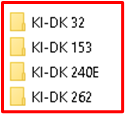
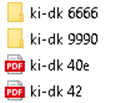
**3.** <span style="font-size: 10.0pt; line-height: 107%; font-family: Roboto; mso-fareast-font-family: Calibri; mso-fareast-theme-font: minor-latin; mso-bidi-font-family: 'Times New Roman'; mso-bidi-theme-font: minor-bidi; mso-ansi-language: DE; mso-fareast-language: EN-US; mso-bidi-language: AR-SA;">In dem Ordner Ihres Betriebes ist <u>je Fahrzeug ein Ordner angelegt</u>, in welchem sich das Formular zur Fahrzeugkontrolle befindet. </span>**<span style="font-size: 10.0pt; line-height: 107%; font-family: Roboto;">Tippen Sie </span><span style="font-size: 10.0pt; line-height: 107%; font-family: Roboto;">auf das <u>Formular in dem </u></span>**<span style="font-size: 10.0pt; line-height: 107%; font-family: Roboto; mso-fareast-font-family: Calibri; mso-fareast-theme-font: minor-latin; mso-bidi-font-family: 'Times New Roman'; mso-bidi-theme-font: minor-bidi; mso-ansi-language: DE; mso-fareast-language: EN-US; mso-bidi-language: AR-SA;">**<u>Ordner</u>, um es zu öffnen.** </span>

[![grafik.png](https://booky.spiegelblank.de/uploads/images/gallery/2025-09/scaled-1680-/Q4sgrafik.png)](https://booky.spiegelblank.de/uploads/images/gallery/2025-09/Q4sgrafik.png)  
**<span style="font-size: 10.0pt; line-height: 107%; font-family: Roboto; mso-fareast-font-family: Calibri; mso-fareast-theme-font: minor-latin; mso-bidi-font-family: 'Times New Roman'; mso-bidi-theme-font: minor-bidi; color: red; mso-ansi-language: DE; mso-fareast-language: EN-US; mso-bidi-language: AR-SA;">Benutzen Sie ausschließlich das Formular <u>in den Fahrzeugordnern</u>.</span>**<span style="font-size: 10.0pt; line-height: 107%; font-family: Roboto; mso-fareast-font-family: Calibri; mso-fareast-theme-font: minor-latin; mso-bidi-font-family: 'Times New Roman'; mso-bidi-theme-font: minor-bidi; color: red; mso-ansi-language: DE; mso-fareast-language: EN-US; mso-bidi-language: AR-SA;"> Formulare die außerhalb dieser Ordner liegen, sollen <u>nicht</u> benutzt werden.  
</span>

[![grafik.png](https://booky.spiegelblank.de/uploads/images/gallery/2025-09/scaled-1680-/gu5grafik.png)](https://booky.spiegelblank.de/uploads/images/gallery/2025-09/gu5grafik.png)

<span style="font-size: 10.0pt; line-height: 107%; font-family: Roboto; mso-fareast-font-family: Calibri; mso-fareast-theme-font: minor-latin; mso-bidi-font-family: 'Times New Roman'; mso-bidi-theme-font: minor-bidi; mso-ansi-language: DE; mso-fareast-language: EN-US; mso-bidi-language: AR-SA;">**4. Füllen Sie das Formular aus. Tippen Sie in ein Textfeld, um** </span>**<span style="font-size: 10.0pt; line-height: 107%; font-family: Roboto;">**hine**inzuschreiben.</span>**<span style="font-size: 10.0pt; line-height: 107%; font-family: Roboto;"> In manchen Feldern kann auch zwischen vorgegebenen Optionen gewählt werden.  
</span>

[![grafik.png](https://booky.spiegelblank.de/uploads/images/gallery/2025-09/scaled-1680-/tUbgrafik.png)](https://booky.spiegelblank.de/uploads/images/gallery/2025-09/tUbgrafik.png)

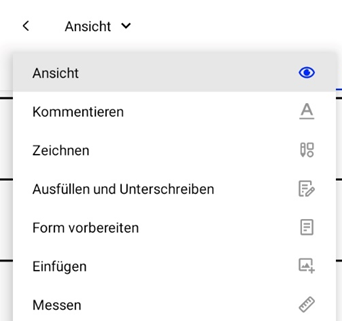
<span style="font-size: 10.0pt; line-height: 107%; font-family: Roboto;">**5.** <span style="font-size: 10.0pt; line-height: 107%; font-family: Roboto; mso-fareast-font-family: Calibri; mso-fareast-theme-font: minor-latin; mso-bidi-font-family: 'Times New Roman'; mso-bidi-theme-font: minor-bidi; mso-ansi-language: DE; mso-fareast-language: EN-US; mso-bidi-language: AR-SA;">Oben links erkennen Sie das zurzeit ausgewählte Werkzeug. **<u>Tippen Sie darauf</u>, um dieses zu wechseln.** </span></span>

[![grafik.png](https://booky.spiegelblank.de/uploads/images/gallery/2025-09/scaled-1680-/8bcgrafik.png)](https://booky.spiegelblank.de/uploads/images/gallery/2025-09/8bcgrafik.png)  
**<u><span style="font-size: 10.0pt; line-height: 107%; font-family: Roboto;"><span style="font-size: 10.0pt; line-height: 107%; font-family: Roboto; mso-fareast-font-family: Calibri; mso-fareast-theme-font: minor-latin; mso-bidi-font-family: 'Times New Roman'; mso-bidi-theme-font: minor-bidi; mso-ansi-language: DE; mso-fareast-language: EN-US; mso-bidi-language: AR-SA;">Tippen Sie auf Einfügen</span></span></u>**<span style="font-size: 10.0pt; line-height: 107%; font-family: Roboto;"><span style="font-size: 10.0pt; line-height: 107%; font-family: Roboto; mso-fareast-font-family: Calibri; mso-fareast-theme-font: minor-latin; mso-bidi-font-family: 'Times New Roman'; mso-bidi-theme-font: minor-bidi; mso-ansi-language: DE; mso-fareast-language: EN-US; mso-bidi-language: AR-SA;">, danach auf das Bild-Symbol und anschließend in das Feld für den Führerschein, um ein Bild aufzunehmen oder ein bereits vorhandenes Bild einzufügen.</span></span>**<span style="font-size: 10.0pt; line-height: 107%; font-family: Roboto;"><span style="font-size: 10.0pt; line-height: 107%; font-family: Roboto; mso-fareast-font-family: Calibri; mso-fareast-theme-font: minor-latin; mso-bidi-font-family: 'Times New Roman'; mso-bidi-theme-font: minor-bidi; mso-ansi-language: DE; mso-fareast-language: EN-US; mso-bidi-language: AR-SA;">  
</span></span>**

[![grafik.png](https://booky.spiegelblank.de/uploads/images/gallery/2025-09/scaled-1680-/qDDgrafik.png)](https://booky.spiegelblank.de/uploads/images/gallery/2025-09/qDDgrafik.png)**<u><span style="font-size: 10.0pt; line-height: 107%; font-family: Roboto;">  
</span></u>**

[![grafik.png](https://booky.spiegelblank.de/uploads/images/gallery/2025-09/scaled-1680-/ur9grafik.png)](https://booky.spiegelblank.de/uploads/images/gallery/2025-09/ur9grafik.png)  
**<span style="font-size: 10.0pt; line-height: 107%; font-family: Roboto;">Tippen Sie auf </span><u><span style="font-size: 10.0pt; line-height: 107%; font-family: Roboto;">Zeichnen,</span></u>**<span style="font-size: 10.0pt; line-height: 107%; font-family: Roboto;"> um z.B. eine Unterschrift zu ergänzen oder Schäden am Fahrzeug zu erfassen.</span>

<span style="font-size: 10.0pt; line-height: 107%; font-family: Roboto;"><span style="font-size: 10.0pt; line-height: 107%; font-family: Roboto; mso-fareast-font-family: Calibri; mso-fareast-theme-font: minor-latin; mso-bidi-font-family: 'Times New Roman'; mso-bidi-theme-font: minor-bidi; mso-ansi-language: DE; mso-fareast-language: EN-US; mso-bidi-language: AR-SA;">Tippen Sie auf den Stift</span></span><span style="font-size: 10.0pt; line-height: 107%; font-family: Roboto;"><span style="font-size: 10.0pt; line-height: 107%; font-family: Roboto; mso-fareast-font-family: Calibri; mso-fareast-theme-font: minor-latin; mso-bidi-font-family: 'Times New Roman'; mso-bidi-theme-font: minor-bidi; mso-ansi-language: DE; mso-fareast-language: EN-US; mso-bidi-language: AR-SA;">, um zu schreiben oder den Radierer, um Fehler zu korrigieren</span></span>**<span style="font-size: 10.0pt; line-height: 107%; font-family: Roboto;"><span style="font-size: 10.0pt; line-height: 107%; font-family: Roboto; mso-fareast-font-family: Calibri; mso-fareast-theme-font: minor-latin; mso-bidi-font-family: 'Times New Roman'; mso-bidi-theme-font: minor-bidi; mso-ansi-language: DE; mso-fareast-language: EN-US; mso-bidi-language: AR-SA;"> </span></span>**<span style="font-size: 10.0pt; line-height: 107%; font-family: Roboto;"><span style="font-size: 10.0pt; line-height: 107%; font-family: Roboto; mso-fareast-font-family: Calibri; mso-fareast-theme-font: minor-latin; mso-bidi-font-family: 'Times New Roman'; mso-bidi-theme-font: minor-bidi; mso-ansi-language: DE; mso-fareast-language: EN-US; mso-bidi-language: AR-SA;">(Die Schriftfarbe kann weiter rechts ebenfalls eingestellt werden).</span></span>

[![grafik.png](https://booky.spiegelblank.de/uploads/images/gallery/2025-09/scaled-1680-/7eugrafik.png)](https://booky.spiegelblank.de/uploads/images/gallery/2025-09/7eugrafik.png)

[![grafik.png](https://booky.spiegelblank.de/uploads/images/gallery/2025-09/scaled-1680-/hXtgrafik.png)](https://booky.spiegelblank.de/uploads/images/gallery/2025-09/hXtgrafik.png)  

  
<span style="font-size: 10.0pt; line-height: 107%; font-family: Roboto; mso-fareast-font-family: Calibri; mso-fareast-theme-font: minor-latin; mso-bidi-font-family: 'Times New Roman'; mso-bidi-theme-font: minor-bidi; mso-ansi-language: DE; mso-fareast-language: EN-US; mso-bidi-language: AR-SA;">Um wieder in einem Textfeld schreiben zu können,</span>**<span style="font-size: 10.0pt; line-height: 107%; font-family: Roboto; mso-fareast-font-family: Calibri; mso-fareast-theme-font: minor-latin; mso-bidi-font-family: 'Times New Roman'; mso-bidi-theme-font: minor-bidi; mso-ansi-language: DE; mso-fareast-language: EN-US; mso-bidi-language: AR-SA;"> <u>tippe auf Ansicht.  
  
</u></span>**

**<span style="font-size: 10.0pt; line-height: 107%; font-family: Roboto; mso-fareast-font-family: Calibri; mso-fareast-theme-font: minor-latin; mso-bidi-font-family: 'Times New Roman'; mso-bidi-theme-font: minor-bidi; mso-ansi-language: DE; mso-fareast-language: EN-US; mso-bidi-language: AR-SA;">6. </span>****<span style="font-size: 10.0pt; line-height: 107%; font-family: Roboto; mso-fareast-font-family: Roboto; mso-bidi-font-family: Roboto;"><span style="mso-list: Ignore;"><span style="font: 7.0pt 'Times New Roman';"> </span></span></span>****<span style="font-size: 10.0pt; line-height: 107%; font-family: Roboto;">Das Dokument speichert automatisch. </span>**<span style="font-size: 10.0pt; line-height: 107%; font-family: Roboto;">Wenn Sie das Formular fertig bearbeitet haben, </span><span style="font-size: 10.0pt; line-height: 107%; font-family: Roboto;"><u>können Sie es schließen.</u></span>

**7. <u><span style="font-size: 10.0pt; line-height: 107%; font-family: Roboto;">Tippen Sie auf das Symbol</span></u><span style="font-size: 10.0pt; line-height: 107%; font-family: Roboto;"> zur Synchronisierung. </span>**<span style="font-size: 10.0pt; line-height: 107%; font-family: Roboto;">N</span><span style="font-size: 10.0pt; line-height: 107%; font-family: Roboto; mso-bidi-font-family: Tahoma; mso-no-proof: yes;">ach ein paar Minuten sind die </span><span style="font-size: 10.0pt; line-height: 107%; font-family: Roboto; mso-bidi-font-family: Tahoma; mso-no-proof: yes;">Änderungen des Formulars synchronisiert.  
</span>

[![grafik.png](https://booky.spiegelblank.de/uploads/images/gallery/2025-09/scaled-1680-/gL1grafik.png)](https://booky.spiegelblank.de/uploads/images/gallery/2025-09/gL1grafik.png)

**8.** <span style="font-size: 10.0pt; line-height: 107%; font-family: Roboto;">Falls Sie </span>**<span style="font-size: 10.0pt; line-height: 107%; font-family: Roboto;">Schäden am Auto oder sonstige Dokumente </span>**<span style="font-size: 10.0pt; line-height: 107%; font-family: Roboto;">fotografiert haben und dem Formular anfügen wollen, </span>**<span style="font-size: 10.0pt; line-height: 107%; font-family: Roboto;"><u>verschieben Sie die Fotos in den Fahrzeugordner.</u> </span><span style="font-size: 10.0pt; line-height: 107%; font-family: Roboto;"><span style="color: red;">Folgen Sie dafür den nächsten Schritten.</span></span><u><span style="font-size: 10.0pt; line-height: 107%; font-family: Roboto; mso-bidi-font-family: Tahoma; color: red; mso-no-proof: yes;"> </span></u>**

**<span style="font-size: 10.0pt; line-height: 107%; font-family: Roboto; mso-bidi-font-family: Tahoma; mso-no-proof: yes;">9. </span>**<span style="font-size: 10.0pt; line-height: 107%; font-family: Roboto; mso-bidi-font-family: Tahoma; mso-no-proof: yes;"><span style="font-size: 10.0pt; line-height: 107%; font-family: Roboto; mso-fareast-font-family: Calibri; mso-fareast-theme-font: minor-latin; mso-bidi-font-family: 'Times New Roman'; mso-bidi-theme-font: minor-bidi; mso-ansi-language: DE; mso-fareast-language: EN-US; mso-bidi-language: AR-SA;">Öffnen Sie die App „<u>Eigene Dateien</u>“  
</span></span>

[![grafik.png](https://booky.spiegelblank.de/uploads/images/gallery/2025-09/scaled-1680-/q0xgrafik.png)](https://booky.spiegelblank.de/uploads/images/gallery/2025-09/q0xgrafik.png)

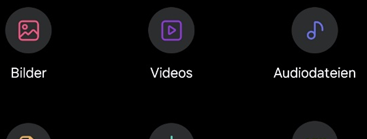
**10.** Tippen Sie auf "Bilder"

[![grafik.png](https://booky.spiegelblank.de/uploads/images/gallery/2025-09/scaled-1680-/4UPgrafik.png)](https://booky.spiegelblank.de/uploads/images/gallery/2025-09/4UPgrafik.png)
<span style="font-size: 10.0pt; line-height: 107%; font-family: Roboto; mso-bidi-font-family: Tahoma; mso-no-proof: yes;"><span style="font-size: 10.0pt; line-height: 107%; font-family: Roboto; mso-fareast-font-family: Calibri; mso-fareast-theme-font: minor-latin; mso-bidi-font-family: 'Times New Roman'; mso-bidi-theme-font: minor-bidi; mso-ansi-language: DE; mso-fareast-language: EN-US; mso-bidi-language: AR-SA;">**11.** Suchen Sie das Bild heraus, dass Sie benutzen möchten</span></span>

<span style="font-size: 10.0pt; line-height: 107%; font-family: Roboto; mso-bidi-font-family: Tahoma; mso-no-proof: yes;"><span style="font-size: 10.0pt; line-height: 107%; font-family: Roboto; mso-fareast-font-family: Calibri; mso-fareast-theme-font: minor-latin; mso-bidi-font-family: 'Times New Roman'; mso-bidi-theme-font: minor-bidi; mso-ansi-language: DE; mso-fareast-language: EN-US; mso-bidi-language: AR-SA;">**12.** Tippen und halten Sie auf dem Bild </span></span><span style="mso-ignore: vglayout; position: absolute; z-index: -1895748608; left: 0px; margin-left: 286px; margin-top: 9px; width: 312px; height: 45px;"><span style="font-size: 10.0pt; line-height: 107%; font-family: Roboto;">Tippen und halten Sie auf dem Bild </span></span><span style="font-size: 10.0pt; line-height: 107%; font-family: Roboto;">gedrückt und wählen Sie unten „<u>Verschieben</u>“ aus.  
</span>

[![grafik.png](https://booky.spiegelblank.de/uploads/images/gallery/2025-09/scaled-1680-/UtZgrafik.png)](https://booky.spiegelblank.de/uploads/images/gallery/2025-09/UtZgrafik.png)

**13.** <span style="font-size: 10.0pt; line-height: 107%; font-family: Roboto;">Tippen Sie auf dem Startbildschirm auf den <u>Ordner „Fahrzeugkontrolle“</u>.  
</span>

[![grafik.png](https://booky.spiegelblank.de/uploads/images/gallery/2025-09/scaled-1680-/V9pgrafik.png)](https://booky.spiegelblank.de/uploads/images/gallery/2025-09/V9pgrafik.png)

<span style="font-size: 10.0pt; line-height: 107%; font-family: Roboto;">**14.** Wäh</span><span style="font-size: 10.0pt; line-height: 107%; font-family: Roboto;">len Sie den <u>Ordner des Fahrzeugs</u> aus, bei dem Sie ein Bild hinzufügen möchten.</span>

<span style="font-size: 10.0pt; line-height: 107%; font-family: Roboto;">**15.** Tippen Sie unten auf "Hierhin verschieben"  
</span>

[![grafik.png](https://booky.spiegelblank.de/uploads/images/gallery/2025-09/scaled-1680-/E1Xgrafik.png)](https://booky.spiegelblank.de/uploads/images/gallery/2025-09/E1Xgrafik.png)

<span style="font-size: 10.0pt; line-height: 107%; font-family: Roboto;">  
</span>

<span style="font-size: 10.0pt; line-height: 107%; font-family: Roboto;">  
</span>